
POEMS SG1.4.36 - App Store
You'll be able to see results in few seconds.
Publisher Description
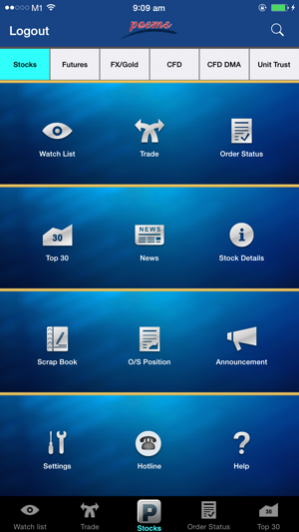
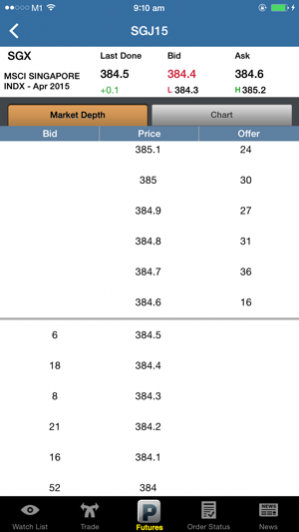
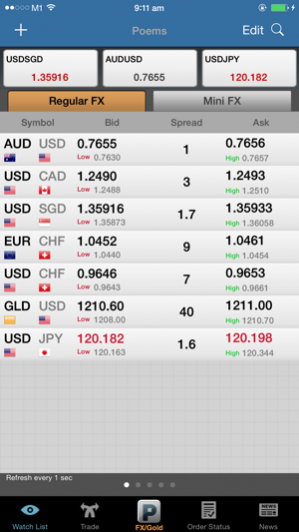
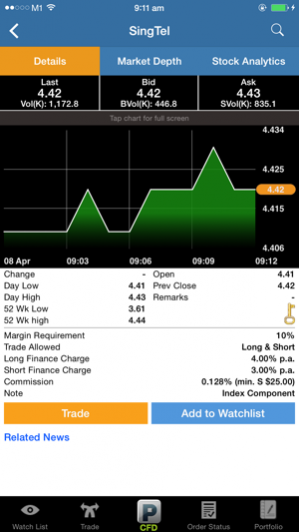
Smart trading around the world.
Trade Shares, Futures, Forex, CFD and Unit Trust trading from a single login anytime, anywhere!
POEMS Mobile helps you keep an eye on the market so that you will not miss any trading opportunity wherever you are. You can stay on top of your trades with easy access to your positions and the market conditions with streaming prices, real time trading limits and order status.
Features for Stocks trading:
• Access multiple markets using one account
• Easy access to the world indices
• Streaming live prices for stock exchanges such as SGX, NASDAQ, NYSE, AMEX, HKEx, Bursa and more
• Auto-calculation of the bid size and gross contract value
• Live updates of trading limits
• Monitor your favourite stocks from various exchanges on each Watch List
• Shortcuts to important pages, such as Watch List, Top 30, Trade, Order Status
• Ability to control frequency of stock quote updates
Features for Futures trading:
• Trade Futures contracts
• Manage your orders and stay updated with your positions at a quick glance
• Monitor the markets with real time streaming prices
• Monitor your favourite Futures contracts across various exchanges on each Watch List
• Integrated Market Depth / Daily and Minute Charts for your analysis
Features for Fx/Gold trading:
• Mini and Regular Forex / Bullion contracts now available for trading
• Manage your orders and stay updated with your positions at a quick glance
• Monitor the markets with real time streaming prices
• Create your own Watch Lists of favourite currency pairs
• Daily and Minute Charts for your charting analysis
Features for CFD Trading:
• Access more than 1,200 CFDs from across SGX, Bursa, HKEx, NYSE, NASDAQ, INDX
• Trade Shares CFD or Direct Market Access (DMA) CFD anytime, anywhere
• Be empowered with our limit and stop limit* orders to trade or hedge your portfolio
• Easily create and edit watch lists from any product category or market. Add up to 20 counters/indices to any of your 5 watch lists
• Tap onto the CFD you are looking for and find all the information you need to trade, including trading costs
• Always be in control of your orders by viewing the order status of your trades done on the same day.
*Only available for Shares CFD
Features for Unit Trust:
• Invest unit trust funds anytime and anywhere
• Enjoy quick access to your portfolio and your funds’ performances.
• View order and payment status of your transactions.
• Create Watch Lists of your favourite funds.
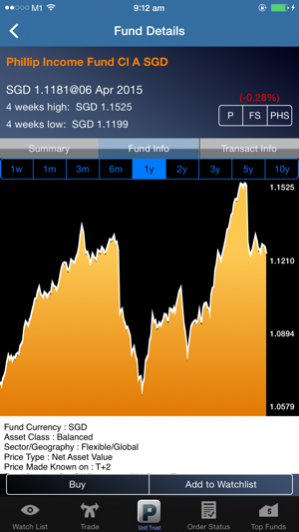
• Obtain fund information and performance charts from 1 week to 10 years.
• Stay updated with latest fund announcements, promotions, top performing and top selling funds.
To open a POEMS account for Stocks / Futures / Forex / CFD / Unit Trust, call 6531 1555 or visit www.poems.com.sg
PhillipCapital Website – hyperlink to www.phillip.com.sg
Requirements: Compatible with iPhone, iPod touch and iPad. Requires iOS 6 or later.
Oct 10, 2017 Version 1.4.36
- 2FA support enhancement: one- time acceptance of Risk Awareness Statement (RAS) if opted out from 2FA
- General performance improvements
About POEMS SG
The company that develops POEMS SG is Phillip Securities Pte. Ltd.. The latest version released by its developer is 1.4.36.
To install POEMS SG on your iOS device, just click the green Continue To App button above to start the installation process. The app is listed on our website since 2017-10-10 and was downloaded 0 times. We have already checked if the download link is safe, however for your own protection we recommend that you scan the downloaded app with your antivirus. Your antivirus may detect the POEMS SG as malware if the download link is broken.
How to install POEMS SG on your iOS device:
- Click on the Continue To App button on our website. This will redirect you to the App Store.
- Once the POEMS SG is shown in the iTunes listing of your iOS device, you can start its download and installation. Tap on the GET button to the right of the app to start downloading it.
- If you are not logged-in the iOS appstore app, you'll be prompted for your your Apple ID and/or password.
- After POEMS SG is downloaded, you'll see an INSTALL button to the right. Tap on it to start the actual installation of the iOS app.
- Once installation is finished you can tap on the OPEN button to start it. Its icon will also be added to your device home screen.
Program Details
System requirements
Download information
Pricing
Version History
version 1.4.36
posted on 2017-10-10
Oct 10, 2017 Version 1.4.36
- 2FA support enhancement: one- time acceptance of Risk Awareness Statement (RAS) if opted out from 2FA
- General performance improvements
version 1.4.32
posted on 2010-10-08
version 1.4.36
posted on 1970-01-01
2017年10月10日 Version 1.4.36
- 2FA support enhancement: one- time acceptance of Risk Awareness Statement (RAS) if opted out from 2FA
- General performance improvements
Disclaimer
Official App Store Link
We do not host POEMS SG on our servers. We did not scan it for viruses, adware, spyware or other type of malware. This app is hosted by Apple and passed their terms and conditions to be listed there. We recommend caution when installing it.
The App Store link for POEMS SG is provided to you by apps112.com without any warranties, representations or guarantees of any kind, so access it at your own risk.
If you have questions regarding this particular app contact the publisher directly. For questions about the functionalities of apps112.com contact us.
